An IPTV free trial sounds like the perfect way to try before you buy – and used properly, it is. But free trials are also where many Irish viewers get caught out: some hand over card details they should never have shared, others waste their trial on a quiet Tuesday afternoon and learn nothing useful, and a few download apps from places they really should not trust.
This guide shows you how to claim an IPTV free trial safely, how to prepare so you do not waste a minute of it, and the exact 24-hour checklist that tells you whether a service is worth paying for. It also explains what a free trial cannot tell you – and when a short paid plan is the smarter test.
Key takeaways
- A genuine IPTV free trial never needs your card details, bank details or passwords.
- Most trials last around 24 hours, so planning matters more than the length.
- Always run your test during peak time – 7pm to 10pm – when weak services fall over.
- A trial proves the basics; a one-month plan proves long-term reliability.
In this guide:
What an IPTV Free Trial Is (and What It Is Not)
An IPTV free trial is a short window of access to a provider’s service – live channels, the TV guide and usually some on-demand content – delivered over your broadband to an app on your TV, Firestick, phone or computer. You get temporary login details, install a player app and watch as if you were a paying customer.
What a trial typically includes:
- A time limit – usually 12 to 48 hours, most often 24.
- One connection – one stream at a time, on one device.
- Most or all live channels – though some providers hold back certain categories or on-demand titles.
- Normal picture quality – a good provider gives you the same quality paying customers get.
What a free trial is not is a guarantee. It is a snapshot. It shows you how the service behaves on one day, on one device, in your home. That is valuable – but only if you use it to test the right things.
How to Claim an IPTV Free Trial Safely
Follow these steps and you will avoid almost every common problem.
- Request it directly from the provider. Use the contact method shown on their own website, such as WhatsApp or email – not a random link from a comment section or social media post.
- Tell them your device. Say exactly what you will watch on – for example, a Samsung Smart TV or an Amazon Firestick – so they can point you to the right app.
- Use a well-known player app. Install apps from your device’s official app store wherever possible. Our guide to the best IPTV apps compares the popular options.
- Share only what is needed. A first name and your device type are enough. Never share bank details, card numbers or passwords from other accounts.
- Read the terms. Even for a free trial, a trustworthy provider has clear terms explaining how plans, renewals and refunds work.
IPTV Free Trial Red Flags
Most free trials are exactly what they claim to be. But watch for these warning signs – any one of them is a reason to stop.
| What you see | What it usually means | What to do |
|---|---|---|
| Card details required for a “free” trial | Risk of unexpected charges or auto-renewal | Walk away |
| Download link to an unknown app file | Possible security risk to your device | Use an app-store player instead |
| No website, terms or business details | No accountability if anything goes wrong | Choose a provider with clear terms |
| Trial starts at an odd hour you did not choose | Your test will miss peak time | Ask to start late afternoon |
| Pressure to buy 12 months before the trial ends | The provider is not confident in the service | Take your time and decide afterwards |
| No reply to messages during the trial | Support will be worse after you pay | Treat it as a fail |
Prepare Before Your Trial Starts
Ten minutes of preparation is the difference between a useful trial and a wasted one. Do these before you request your login details:
- Run an evening speed test on Speedtest. Aim for about 10 Mbps for HD, 15 Mbps for Full HD and 25 Mbps or more for 4K.
- Write down your top ten channels – the ones you actually watch every week.
- Check the fixture list and plan your trial around a live match or a big programme if you can.
- Update your device and restart your router so old software does not skew the result.
- Use a cable or 5GHz Wi-Fi for the main TV. Our room-by-room device guide explains the best set-up for each room.
The 24-Hour IPTV Free Trial Checklist
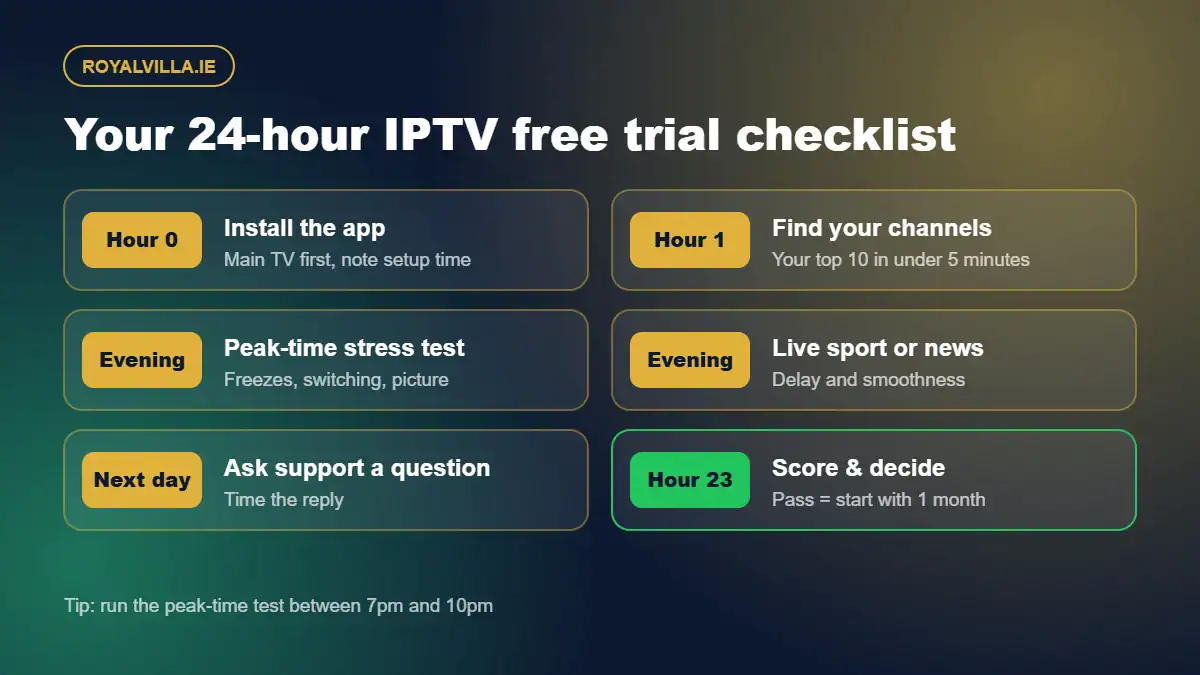
This is the heart of the guide. Work through each stage and jot down a quick note or score for each one.
Hour 0 – Install and log in
Time how long setup takes on your main TV. With clear instructions it should be well under 15 minutes. If you are stuck, message the provider – this doubles as your first support test.
Hour 1 – Find your channels
Can you find your ten key channels in under five minutes? Are they in sensible categories? Does the TV guide show the right programmes at the right times in Irish time?
Evening – Peak-time stress test
Watch for at least 20 minutes between 7pm and 10pm. Count any freezes, check how quickly channels switch and notice whether the picture drops in quality as more people come online.
Evening – Live sport or live news
Live events are the hardest thing for any service to deliver. Watch a live match or news bulletin and look for smooth motion and a stable picture throughout.
Next day – Support check
Ask a genuine question, such as how many screens a plan includes or whether plans renew automatically. Time the reply. Minutes is excellent; hours is acceptable; silence is a fail.
Hour 23 – Score and decide
Give each stage a score out of 5. A service that scores 4 or 5 on peak-time stability and support has passed the tests that matter most.
What an IPTV Free Trial Cannot Tell You
Even a perfectly planned trial has limits. In 24 hours you cannot see how the service handles a full month of busy weekends, whether the TV guide stays accurate, how renewals work in practice or how support responds to a real problem rather than a simple question.
That is why we always say a trial is the first test, not the last. Our honest guide to IPTV trials in Ireland goes deeper into why the way you use trial time matters more than the trial itself.
IPTV Free Trial vs a One-Month Plan
| Free trial | One-month plan | |
|---|---|---|
| Cost | Free | €14.99 |
| Length | Usually 24 hours | 30 days |
| Shows peak-time stability | One evening | Every evening, every weekend |
| Shows support quality | A simple question | Real issues over time |
| Best for | Checking setup, channels and the basics | Proving long-term reliability |
The best approach for most Irish households is to use both: a free trial to rule out obvious problems, then a one-month plan to confirm the service holds up before moving to a longer, cheaper-per-month plan.
After the Trial: How to Decide
Your trial passed if the service was stable at peak time, your key channels were easy to find, the picture matched your broadband and support replied quickly. If it failed on stability or support, move on – those two problems rarely fix themselves.
If it passed, here is how plan lengths compare at RoyalVilla.ie:
| Plan | Total price | Per month | Best for |
|---|---|---|---|
| 1 Month | €14.99 | €14.99 | Your first month after a trial |
| 3 Months | €29.99 | €10.00 | A season run-in or summer of sport |
| 6 Months | €39.99 | €6.67 | Households who already know they like it |
| 12 Months | €49.99 | €4.17 | Best value for all-year viewing |
See full details on our subscription page, or read what happens after you buy so you know exactly what to expect on day one.
Getting the Most From a Free Trial in Your Household
Sports fans
Plan the trial around a real fixture. A service that is smooth on a quiet afternoon but stutters during a big match has failed the only test you care about.
Families
Test the children’s channels and the on-demand section, not just the main channels. Ask about multi-room if two or more TVs will be on at once.
Older viewers
Judge how easy the menus feel and how patient the support is. Simplicity and friendly help matter more than 4K or a giant film library.
Rural homes
Test in HD rather than 4K if you are on fixed wireless or mobile broadband, and check for any data cap. If you hit buffering, our buffering fixes guide has quick solutions to try before you judge the service.
Staying Safe and Legal
Keep your trial login private, never share passwords from other accounts and use payment methods you trust when you do buy. Make sure the way you watch complies with the laws that apply in Ireland, and if you are unsure how a particular service operates, ask the provider directly before you pay.
IPTV Free Trial FAQ
Is an IPTV free trial really free?
A genuine IPTV free trial should cost nothing and should never ask for card details. If a website demands payment information for a “free” trial, treat it as a warning sign and walk away.
How long does an IPTV free trial last?
Most last between 12 and 48 hours, with 24 hours being the most common. That is enough to test setup, your key channels and one busy evening if you plan it properly.
When is the best time to start an IPTV free trial?
Start it in the late afternoon so your trial window covers a full evening, ideally one with live sport or a popular programme. Peak time between 7pm and 10pm is when weak services struggle.
Can I use an IPTV free trial on more than one device?
Usually only one connection is included, so test on your main TV first. If you need several screens at once, ask about multi-room options before you buy a plan.
What should I do after an IPTV free trial ends?
Score the service on stability, channels, picture and support. If it passed, start with a short plan such as one month rather than jumping straight into a full year.
Final Thoughts
An IPTV free trial is only as useful as the plan behind it. Claim it safely, prepare in advance, run it during peak time and score it honestly – then follow it with a one-month plan before committing for longer. That simple approach protects your money and leads you to a service you will be happy with all year.
Want to test RoyalVilla.ie? Message us on WhatsApp with your device and we will tell you the quickest way to get started, or compare our plans from €14.99.